---
title: Recommended devices
description: Find the best compatibility with the Hiru eye tracker and devices recommended by Irisbond
---
[Skip to content](https://knowledge.irisbond.com/en/windows/recommended-devices#main-content)
English
Show submenu for translations

Open main navigation
Close main navigation
- English
Show submenu for translations
- Ir a irisbond.com
Ir a irisbond.com
Hi, how can we help you?
- There are no suggestions because the search field is empty.
1. [Knowledge base](https://knowledge.irisbond.com/en?hsLang=en)
2. [Hiru & Windows](https://knowledge.irisbond.com/en/hiru-windows?hsLang=en)
# Recommended devices
## Find the best compatibility with the Hiru eye tracker and devices recommended by Irisbond
Irisbond ensures the perfect compatibility of Hiru with those devices:
- **Microsoft Surface Pro 7+**
- **Microsoft Surface Pro 10**
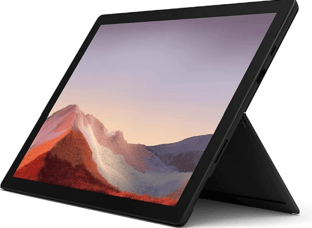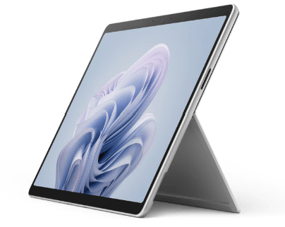
*Hiru is not yet compatible with devices based on ARM processors.*
- Minimum requirements:
- CPU 1.33GHz
- RAM 8GB
- Hard Disk 3GB + HDD
- USB 3.0
- Storage 128GB
### **Operating system:**
Hiru is compatible with these Windows operating systems
- Windows 11 Pro
### Cables: Always use Irisbond's recommended cables & adapters
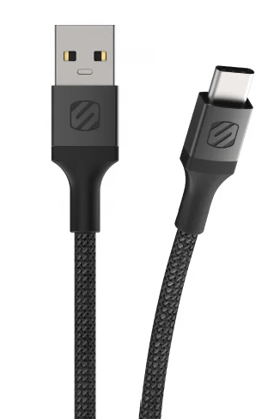
Ensure that you connect the Hiru to the device using the appropriate **Scosche StrikeLine cable**. This MFi-certified cable guarantees optimal connectivity and performance with the Hiru.
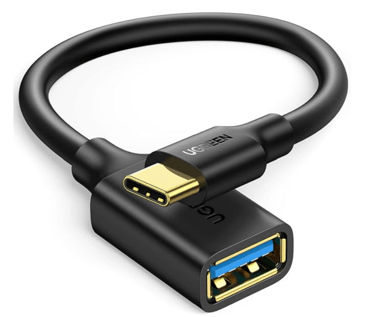
This adapter is the one that should be used with Hiru: Ugreen USB A-C.
### **Current Software versions:**
- EasyClick: 23.203.2.94
- Systray: 24.202.1.0
- Hiru Firmware: 4.0.4
### **How to determine Make and Model of your Windows Device**
1. Using the System Information Tool (Easiest & Most Detailed)
This is the most comprehensive tool for viewing hardware details.
Press the Windows key + R to open the Run dialog box.
Type msinfo32 and press Enter.
The System Information window will open. Look under the System Summary
section for the following two entries:
System Manufacturer: This is the Make (e.g., Dell, HP, Lenovo).
System Model: This is the specific Model (e.g., XPS 13 9310, Spectre x360).
OR
2. Using the Command Prompt (Quickest)
This method lets you pull the specific details directly without navigating a graphical interface.
Search for Command Prompt.
Open the Command Prompt application.
Type the following command and press Enter:
wmic csproduct get name, vendor
The output will show the Vendor (Make) and the Name (Model).
- [Frequently Asked Questions](https://knowledge.irisbond.com/en/frequently-asked-questions?hsLang=en#main-content)
- [iPad](https://knowledge.irisbond.com/en/frequently-asked-questions?hsLang=en#ipad)
- [Hiru](https://knowledge.irisbond.com/en/hiru?hsLang=en#main-content)
- [Release notes](https://knowledge.irisbond.com/en/hiru?hsLang=en#release-notes)
- [Eye tracking basics](https://knowledge.irisbond.com/en/hiru?hsLang=en#eye-tracking-basics)
- [Hiru & Windows](https://knowledge.irisbond.com/en/hiru-windows?hsLang=en#main-content)
- [Easy Click](https://knowledge.irisbond.com/en/hiru-windows?hsLang=en#easy-click)
- [Systray](https://knowledge.irisbond.com/en/hiru-windows?hsLang=en#systray)
- [Settings](https://knowledge.irisbond.com/en/hiru-windows?hsLang=en#settings)
- [Hiru & iPad](https://knowledge.irisbond.com/en/hiru-ipad?hsLang=en#main-content)
- [Set-up](https://knowledge.irisbond.com/en/hiru-ipad?hsLang=en#set-up)
- [Hiru App](https://knowledge.irisbond.com/en/hiru-ipad?hsLang=en#hiru-app)
- [Settings](https://knowledge.irisbond.com/en/hiru-ipad?hsLang=en#settings)
- [iPadOS](https://knowledge.irisbond.com/en/hiru-ipad?hsLang=en#ipados)
- [Applications](https://knowledge.irisbond.com/en/hiru-ipad?hsLang=en#applications)
- [Usage](https://knowledge.irisbond.com/en/hiru-ipad?hsLang=en#usage)
- [Oskol iOS](https://knowledge.irisbond.com/en/hiru-ipad?hsLang=en#oskol-ios)
- [Oskol 2](https://knowledge.irisbond.com/en/hiru-ipad?hsLang=en#oskol-2)
- [Versa Eye](https://knowledge.irisbond.com/en/hiru-ipad?hsLang=en#versa-eye)
[](http://irisbond.com)
Centro de ayuda irisbond.com
[mailto:email@email.com](mailto:email@email.com)
Copyright © 2026, IRISBOND