---
title: Recommended iPads and iPadOS
description: "Hiru is compatible with: Recommended iPadOS by Irisbond for the best use: Find your iPadOS version: Settings > General > About > iPadOS version Current Software versions: "
---
[Skip to content](https://knowledge.irisbond.com/en/ipad/setup/compatibility#main-content)
- [English](https://knowledge.irisbond.com/en/ipad/setup/compatibility)
- [Deutsch](https://knowledge.irisbond.com/de/ipad/setup/compatibility)
English
Show submenu for translations

Open main navigation
Close main navigation
- - [English](https://knowledge.irisbond.com/en/ipad/setup/compatibility)
- [Deutsch](https://knowledge.irisbond.com/de/ipad/setup/compatibility)
English
Show submenu for translations
- Ir a irisbond.com
Ir a irisbond.com
Hi, how can we help you?
- There are no suggestions because the search field is empty.
1. [Knowledge base](https://knowledge.irisbond.com/en?hsLang=en)
2. [Hiru & iPad](https://knowledge.irisbond.com/en/hiru-ipad?hsLang=en)
3. [Set-up](https://knowledge.irisbond.com/en/hiru-ipad?hsLang=en#set-up)
# Recommended iPads and iPadOS
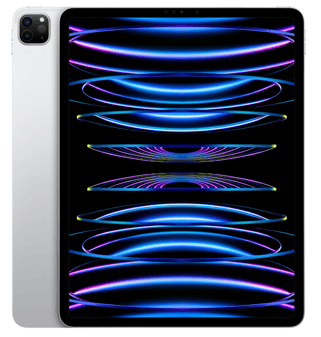
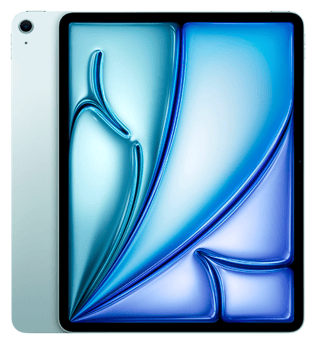
Hiru is compatible with:
- **iPad Pro 12.9"** 6th generation
- **iPad 13" Air** (M2 & M3)
**Recommended iPadOS by Irisbond for the best use:**
- iPad OS 17.6. and higher
Find your iPadOS version: Settings \> General \> About \> iPadOS version
**Current Software versions:**
- Hiru App: 24.400.1
- Hiru Firmware: 4.0.4
### **How to find the Model Name of your iPad**
Using the Settings App
Open the Settings app on your iPad.
Tap General.
Tap About.
Look for the line labeled Model Name. This will give you the user-friendly name, like "iPad Air (5th generation)" or "iPad Pro (11-inch)."
If you don't see "Model Name," look for Model Number. It will initially show a part number (e.g., MK8F3LL/A). Tap the part number to reveal the actual Model Number, which will start with the letter A followed by four digits (e.g., A2588). You can then use this 'A' number to search online for the exact make and model.
- [Frequently Asked Questions](https://knowledge.irisbond.com/en/frequently-asked-questions?hsLang=en#main-content)
- [iPad](https://knowledge.irisbond.com/en/frequently-asked-questions?hsLang=en#ipad)
- [Hiru](https://knowledge.irisbond.com/en/hiru?hsLang=en#main-content)
- [Release notes](https://knowledge.irisbond.com/en/hiru?hsLang=en#release-notes)
- [Eye tracking basics](https://knowledge.irisbond.com/en/hiru?hsLang=en#eye-tracking-basics)
- [Hiru & Windows](https://knowledge.irisbond.com/en/hiru-windows?hsLang=en#main-content)
- [Easy Click](https://knowledge.irisbond.com/en/hiru-windows?hsLang=en#easy-click)
- [Systray](https://knowledge.irisbond.com/en/hiru-windows?hsLang=en#systray)
- [Settings](https://knowledge.irisbond.com/en/hiru-windows?hsLang=en#settings)
- [Hiru & iPad](https://knowledge.irisbond.com/en/hiru-ipad?hsLang=en#main-content)
- [Set-up](https://knowledge.irisbond.com/en/hiru-ipad?hsLang=en#set-up)
- [Hiru App](https://knowledge.irisbond.com/en/hiru-ipad?hsLang=en#hiru-app)
- [Settings](https://knowledge.irisbond.com/en/hiru-ipad?hsLang=en#settings)
- [iPadOS](https://knowledge.irisbond.com/en/hiru-ipad?hsLang=en#ipados)
- [Applications](https://knowledge.irisbond.com/en/hiru-ipad?hsLang=en#applications)
- [Usage](https://knowledge.irisbond.com/en/hiru-ipad?hsLang=en#usage)
- [Oskol iOS](https://knowledge.irisbond.com/en/hiru-ipad?hsLang=en#oskol-ios)
- [Oskol 2](https://knowledge.irisbond.com/en/hiru-ipad?hsLang=en#oskol-2)
- [Versa Eye](https://knowledge.irisbond.com/en/hiru-ipad?hsLang=en#versa-eye)
[](http://irisbond.com)
Centro de ayuda irisbond.com
[mailto:email@email.com](mailto:email@email.com)
Copyright © 2026, IRISBOND