---
title: Oskol 2 components and Control Elements
description: Explore the components of your Oskol 2 and learn about its features
---
[Skip to content](https://knowledge.irisbond.com/en/ipad/oskol2/oskol-2-components#main-content)
- [English](https://knowledge.irisbond.com/en/ipad/oskol2/oskol-2-components)
- [Deutsch](https://knowledge.irisbond.com/de/ipad/oskol2/oskol-2-components)
English
Show submenu for translations

Open main navigation
Close main navigation
- - [English](https://knowledge.irisbond.com/en/ipad/oskol2/oskol-2-components)
- [Deutsch](https://knowledge.irisbond.com/de/ipad/oskol2/oskol-2-components)
English
Show submenu for translations
- Ir a irisbond.com
Ir a irisbond.com
Hi, how can we help you?
- There are no suggestions because the search field is empty.
1. [Knowledge base](https://knowledge.irisbond.com/en?hsLang=en)
2. [Hiru & iPad](https://knowledge.irisbond.com/en/hiru-ipad?hsLang=en)
3. [Oskol 2](https://knowledge.irisbond.com/en/hiru-ipad?hsLang=en#oskol-2)
# Oskol 2 components and Control Elements
## Explore the components of your Oskol 2 and learn about its features

**1.** Button to turn ON/OFF the iPad
**2.** Buttons to adjust the volume
**3.** Hiru eye tracker - the camera to which your eyes need to be visible
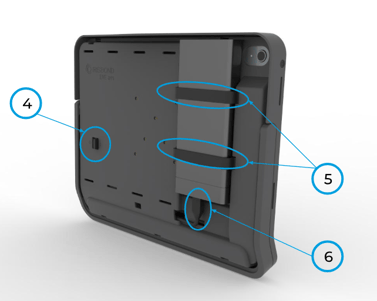
**4.** Switch to Turn ON/OFF Hiru eye tracker
**5.** External battery holder stripes
**6.** USB-C ports for connecting the external battery to the Oskol 2 and charging it. For details on how to properly connect the battery, refer to this [article.](https://knowledge.irisbond.com/en/ipad/oskol2/oskol-2-casing?hsLang=en)
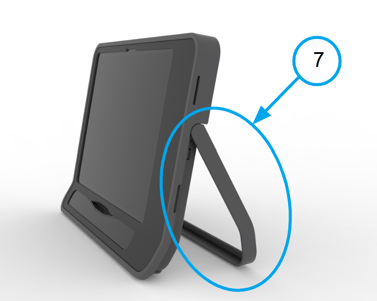
**7.** Foldable kickstand, when necessary to use Oskol 2 on the table
**8.** A universal mounting plate can be found in the back side of the Oskol and provides flexibility when using the solution attached to the mounting arm
- [Frequently Asked Questions](https://knowledge.irisbond.com/en/frequently-asked-questions?hsLang=en#main-content)
- [iPad](https://knowledge.irisbond.com/en/frequently-asked-questions?hsLang=en#ipad)
- [Hiru](https://knowledge.irisbond.com/en/hiru?hsLang=en#main-content)
- [Release notes](https://knowledge.irisbond.com/en/hiru?hsLang=en#release-notes)
- [Eye tracking basics](https://knowledge.irisbond.com/en/hiru?hsLang=en#eye-tracking-basics)
- [Hiru & Windows](https://knowledge.irisbond.com/en/hiru-windows?hsLang=en#main-content)
- [Easy Click](https://knowledge.irisbond.com/en/hiru-windows?hsLang=en#easy-click)
- [Systray](https://knowledge.irisbond.com/en/hiru-windows?hsLang=en#systray)
- [Settings](https://knowledge.irisbond.com/en/hiru-windows?hsLang=en#settings)
- [Hiru & iPad](https://knowledge.irisbond.com/en/hiru-ipad?hsLang=en#main-content)
- [Set-up](https://knowledge.irisbond.com/en/hiru-ipad?hsLang=en#set-up)
- [Hiru App](https://knowledge.irisbond.com/en/hiru-ipad?hsLang=en#hiru-app)
- [Settings](https://knowledge.irisbond.com/en/hiru-ipad?hsLang=en#settings)
- [iPadOS](https://knowledge.irisbond.com/en/hiru-ipad?hsLang=en#ipados)
- [Applications](https://knowledge.irisbond.com/en/hiru-ipad?hsLang=en#applications)
- [Usage](https://knowledge.irisbond.com/en/hiru-ipad?hsLang=en#usage)
- [Oskol iOS](https://knowledge.irisbond.com/en/hiru-ipad?hsLang=en#oskol-ios)
- [Oskol 2](https://knowledge.irisbond.com/en/hiru-ipad?hsLang=en#oskol-2)
- [Versa Eye](https://knowledge.irisbond.com/en/hiru-ipad?hsLang=en#versa-eye)
[](http://irisbond.com)
Centro de ayuda irisbond.com
[mailto:email@email.com](mailto:email@email.com)
Copyright © 2026, IRISBOND