---
title: Snap to Item
description: Here you can find where to find the Snap to Item setting on your iPad and the difference between Snap to Item and pointer.
---
[Skip to content](https://knowledge.irisbond.com/en/ipad/ipados17/snap-to-item#main-content)
- [English](https://knowledge.irisbond.com/en/ipad/ipados17/snap-to-item)
- [Deutsch](https://knowledge.irisbond.com/de/ipad/ipados17/snap-to-item)
English
Show submenu for translations

Open main navigation
Close main navigation
- - [English](https://knowledge.irisbond.com/en/ipad/ipados17/snap-to-item)
- [Deutsch](https://knowledge.irisbond.com/de/ipad/ipados17/snap-to-item)
English
Show submenu for translations
- Ir a irisbond.com
Ir a irisbond.com
Hi, how can we help you?
- There are no suggestions because the search field is empty.
1. [Knowledge base](https://knowledge.irisbond.com/en?hsLang=en)
2. [Hiru & iPad](https://knowledge.irisbond.com/en/hiru-ipad?hsLang=en)
3. [Settings](https://knowledge.irisbond.com/en/hiru-ipad?hsLang=en#settings)
# Snap to Item
## Here you can find where to find the Snap to Item setting on your iPad and the difference between Snap to Item and pointer.
To set it up, make sure your iPad is updated to iPadOS 17 or later, and that Hiru is connected.
Go to Settings \> Accessibility \> Touch \> AssistiveTouch \> Devices \> Hiru \> Snap-to-item \> Toggle ON
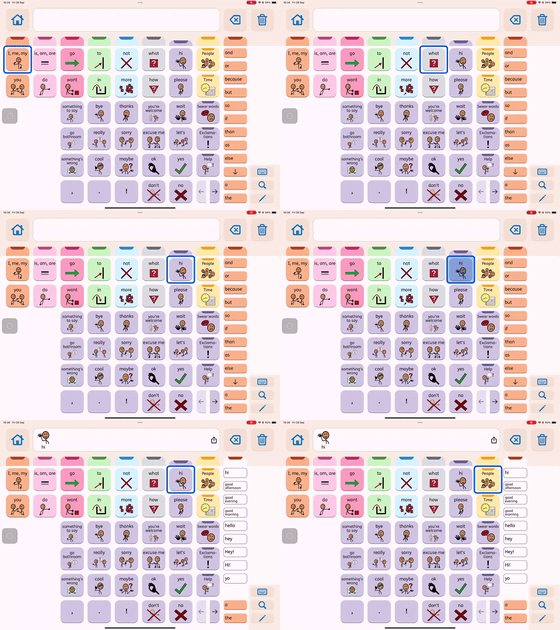The Snap to Item feature enables you to see a cell highlight instead of a visible pointer when interacting with clickable areas on your screen. This feature enhances the stability and comfort of your eye gaze experience, transforming any compatible app into an app specifically designed for eye gaze use.
Check out the video to see the difference!
**TIP:** Add easy to access ways to turn off Snap to Item.
1. Add the Toggle On/off Snap to Item to one of your Hot Corners. [Check more information here.](https://knowledge.irisbond.com/en/ipad/settings/hot-corners?hsLang=en)
2. Add "tap" to the [AssistiveTouch](https://knowledge.irisbond.com/en/migrated/ipad/settings/personalization-of-the-assistive-touch-menu?hsLang=en) menu. When tap is selected, Snap to item will not be active and you will see a visible pointer. (play with turned the [fallback action](https://knowledge.irisbond.com/en/migrated/ipad/settings/fallback-action?hsLang=en) on or off to lock the action into place).
- [Frequently Asked Questions](https://knowledge.irisbond.com/en/frequently-asked-questions?hsLang=en#main-content)
- [iPad](https://knowledge.irisbond.com/en/frequently-asked-questions?hsLang=en#ipad)
- [Hiru](https://knowledge.irisbond.com/en/hiru?hsLang=en#main-content)
- [Release notes](https://knowledge.irisbond.com/en/hiru?hsLang=en#release-notes)
- [Eye tracking basics](https://knowledge.irisbond.com/en/hiru?hsLang=en#eye-tracking-basics)
- [Hiru & Windows](https://knowledge.irisbond.com/en/hiru-windows?hsLang=en#main-content)
- [Easy Click](https://knowledge.irisbond.com/en/hiru-windows?hsLang=en#easy-click)
- [Systray](https://knowledge.irisbond.com/en/hiru-windows?hsLang=en#systray)
- [Settings](https://knowledge.irisbond.com/en/hiru-windows?hsLang=en#settings)
- [Hiru & iPad](https://knowledge.irisbond.com/en/hiru-ipad?hsLang=en#main-content)
- [Set-up](https://knowledge.irisbond.com/en/hiru-ipad?hsLang=en#set-up)
- [Hiru App](https://knowledge.irisbond.com/en/hiru-ipad?hsLang=en#hiru-app)
- [Settings](https://knowledge.irisbond.com/en/hiru-ipad?hsLang=en#settings)
- [iPadOS](https://knowledge.irisbond.com/en/hiru-ipad?hsLang=en#ipados)
- [Applications](https://knowledge.irisbond.com/en/hiru-ipad?hsLang=en#applications)
- [Usage](https://knowledge.irisbond.com/en/hiru-ipad?hsLang=en#usage)
- [Oskol iOS](https://knowledge.irisbond.com/en/hiru-ipad?hsLang=en#oskol-ios)
- [Oskol 2](https://knowledge.irisbond.com/en/hiru-ipad?hsLang=en#oskol-2)
- [Versa Eye](https://knowledge.irisbond.com/en/hiru-ipad?hsLang=en#versa-eye)
[](http://irisbond.com)
Centro de ayuda irisbond.com
[mailto:email@email.com](mailto:email@email.com)
Copyright © 2026, IRISBOND