---
title: What is Hiru for?
description: Hiru is the first eye-tracking device 100% compatible with Windows and iPadOS, in the world
---
[Skip to content](https://knowledge.irisbond.com/en/hiru/what-is-hiru-for#main-content)
English
Show submenu for translations

Open main navigation
Close main navigation
- English
Show submenu for translations
- Ir a irisbond.com
Ir a irisbond.com
Hi, how can we help you?
- There are no suggestions because the search field is empty.
1. [Knowledge base](https://knowledge.irisbond.com/en?hsLang=en)
2. [Hiru](https://knowledge.irisbond.com/en/hiru?hsLang=en)
# What is Hiru for?
## Hiru is the first eye-tracking device in the world that is 100% compatible with Windows and iPadOS.
- Hiru is an **eye tracker** designed for AAC (Alternative and Augmented Communication), to give a voice to thousands of people worldwide who live with communication barriers. The eye tracker enables users to access an iPad using only their gaze.
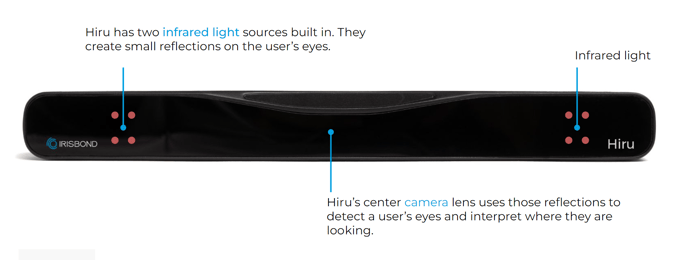
- It is an **infrared-based (IR) eye-tracking device** that can completely replace the traditional mouse and enables you to control the screen with only your eyes.
- Hiru has successfully obtained the **MFi (Made for iPad)** license, showcasing a commitment to quality and compatibility with Apple products. The MFi certification ensures that Hiru's products meet Apple's standards for excellence in design and functionality, providing users with a seamless and reliable experience when using their accessories with iPad devices. This certification is a testament to the company's dedication to delivering high-quality, Apple-compatible products.
### AAC Learning Curve
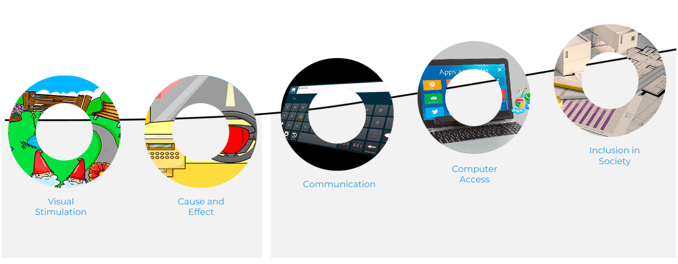
In order to develop the necessary learning skills, it is important to have a proper methodology behind every eye-tracking technology.
When using a dynamic tool like the IRISBOND Learning Curve, you will experience a natural progression in adopting Augmentative and Alternative Communication (AAC), regardless of whether you use touch, buttons, or eye tracking. This learning curve has been developed in collaboration with top professionals in the fields of education and assistive technology. It allows both professionals and users to advance in a planned and intuitive manner, starting with a natural interaction with the computer, and then moving on to effective communication until precise access.
- [Frequently Asked Questions](https://knowledge.irisbond.com/en/frequently-asked-questions?hsLang=en#main-content)
- [iPad](https://knowledge.irisbond.com/en/frequently-asked-questions?hsLang=en#ipad)
- [Hiru](https://knowledge.irisbond.com/en/hiru?hsLang=en#main-content)
- [Release notes](https://knowledge.irisbond.com/en/hiru?hsLang=en#release-notes)
- [Eye tracking basics](https://knowledge.irisbond.com/en/hiru?hsLang=en#eye-tracking-basics)
- [Hiru & Windows](https://knowledge.irisbond.com/en/hiru-windows?hsLang=en#main-content)
- [Easy Click](https://knowledge.irisbond.com/en/hiru-windows?hsLang=en#easy-click)
- [Systray](https://knowledge.irisbond.com/en/hiru-windows?hsLang=en#systray)
- [Settings](https://knowledge.irisbond.com/en/hiru-windows?hsLang=en#settings)
- [Hiru & iPad](https://knowledge.irisbond.com/en/hiru-ipad?hsLang=en#main-content)
- [Set-up](https://knowledge.irisbond.com/en/hiru-ipad?hsLang=en#set-up)
- [Hiru App](https://knowledge.irisbond.com/en/hiru-ipad?hsLang=en#hiru-app)
- [Settings](https://knowledge.irisbond.com/en/hiru-ipad?hsLang=en#settings)
- [iPadOS](https://knowledge.irisbond.com/en/hiru-ipad?hsLang=en#ipados)
- [Applications](https://knowledge.irisbond.com/en/hiru-ipad?hsLang=en#applications)
- [Usage](https://knowledge.irisbond.com/en/hiru-ipad?hsLang=en#usage)
- [Oskol iOS](https://knowledge.irisbond.com/en/hiru-ipad?hsLang=en#oskol-ios)
- [Oskol 2](https://knowledge.irisbond.com/en/hiru-ipad?hsLang=en#oskol-2)
- [Versa Eye](https://knowledge.irisbond.com/en/hiru-ipad?hsLang=en#versa-eye)
[](http://irisbond.com)
Centro de ayuda irisbond.com
[mailto:email@email.com](mailto:email@email.com)
Copyright © 2026, IRISBOND