---
title: Early Stage User Profile 2 - Context Dependent
description: Discover the optimal settings for beginner users who have completed Early Stage User Profile 1 on Hiru with an iPad.
---
[Skip to content](https://knowledge.irisbond.com/en/early-stage-user-profile-2#main-content)
English
Show submenu for translations

Open main navigation
Close main navigation
- English
Show submenu for translations
- Ir a irisbond.com
Ir a irisbond.com
Hi, how can we help you?
- There are no suggestions because the search field is empty.
1. [Knowledge base](https://knowledge.irisbond.com/en?hsLang=en)
2. [Hiru & iPad](https://knowledge.irisbond.com/en/hiru-ipad?hsLang=en)
3. [Settings](https://knowledge.irisbond.com/en/hiru-ipad?hsLang=en#settings)
# Early Stage User Profile 2 - Context Dependent
## Discover the optimal settings for beginner users who have completed Early Stage User Profile 1 on Hiru with an iPad.
**Goals**:
1. Communication and Learning. Use this as a continuation of Early Stage User Profile Profile 1.
2. Skill building for access.
**Activities**: Use AAC, cause and effect, and games apps.
This configuration seeks to shorten the journey to get to any icon so you can get there fast.
The configuration aims to reduce the time it takes to access any icon, allowing users to navigate quickly.
---
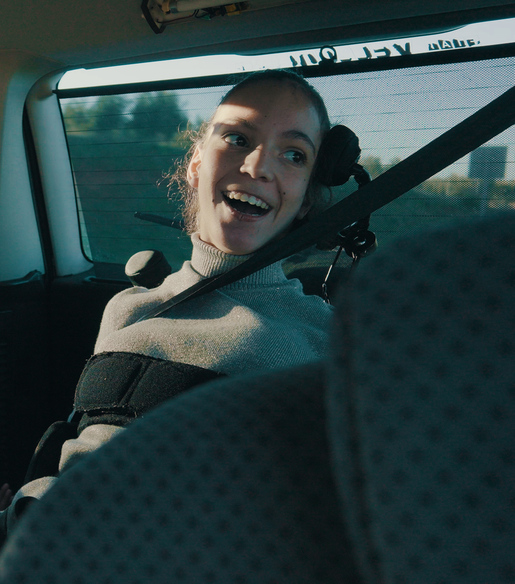
Gema, the pioneer child in Spain to used AAC with eye gaze, takes great pride in her achievement. While she now efficiently uses Hiru and iPad for daily activities as a proficient user, she also started in the Communication and Learning stage. Follow Gema's setup on your iPads during this initial phase!
---
### Recommended customization:
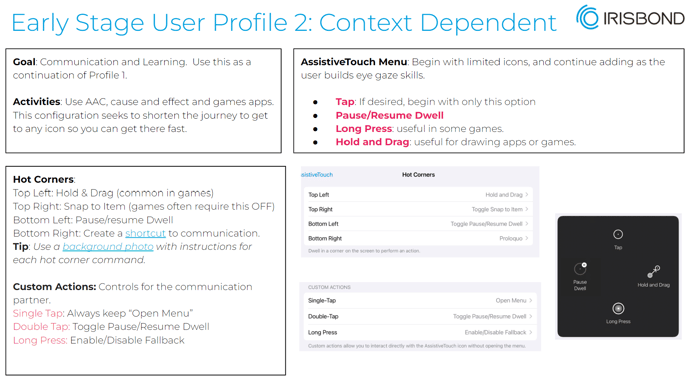
**[Assistive touch menu:](https://knowledge.irisbond.com/en/ipad/settings/personalization-of-the-assistive-touch-menu?hsLang=en)** Add Tap, Pause/Resume Dwell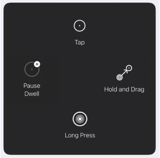 action, Hold and Drag (for games), Long Press.
- You can add each of these actions one at a time to build the selection skill slowly.
**[Calibration](https://knowledge.irisbond.com/en/ipad/hiruapp/calibration-and-positioning-tool?hsLang=en):** Calibrate with 5 or 9 points
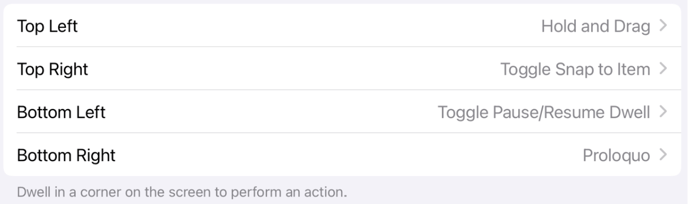
**[Hot corners:](https://knowledge.irisbond.com/en/ipad/settings/hot-corners?hsLang=en)** Slowly start using Hot corners: at the beginning set up only one hot corner, then slowly add all four. For additional help learning hot corners, use the [Hot Corners](https://knowledge.irisbond.com/en/ipad/settings/hot-corners?hsLang=en) background library or add a cell in the user's communication app to indicate what each corner does.
[](https://www.youtube.com/watch?v=GfzkCydNb4A)
\*Proloquo is an example of a favorite communication app.
[**Snap to Item:**](https://knowledge.irisbond.com/en/ipad/ipados17/snap-to-item?hsLang=en) ON
[**Auto Hide:**](https://knowledge.irisbond.com/en/ipad/ipados17/invisible-cursor?hsLang=en) ON **Time:** 0.25 s
[**Dwell Time:**](https://knowledge.irisbond.com/en/ipad/settings/dwell-time?hsLang=en) 1 s
[**Idle opacity:**](https://knowledge.irisbond.com/en/ipad/settings/invisible-assistive-touch-menu?hsLang=en) 30 %
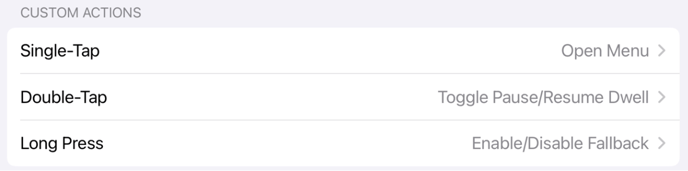
**Custom actions:** Activate all three for partner control.
**[](https://www.youtube.com/watch?v=ZTvt75Tge24&list=PLqLn9oRVFqBVbkYFB-DKY5qj9haRFXQ9O&index=21)**
**[Widgets:](https://knowledge.irisbond.com/en/ipad/settings/shortcuts?hsLang=en)** Use widgets for easier click and fast access to app or webpage
**[Fallback action:](https://knowledge.irisbond.com/en/ipad/settings/fallback-action?hsLang=en)** For Beginner Users, it can be useful to set your Fallback Action to "Pause Dwell"
**Keep the home screen clean and organized:**
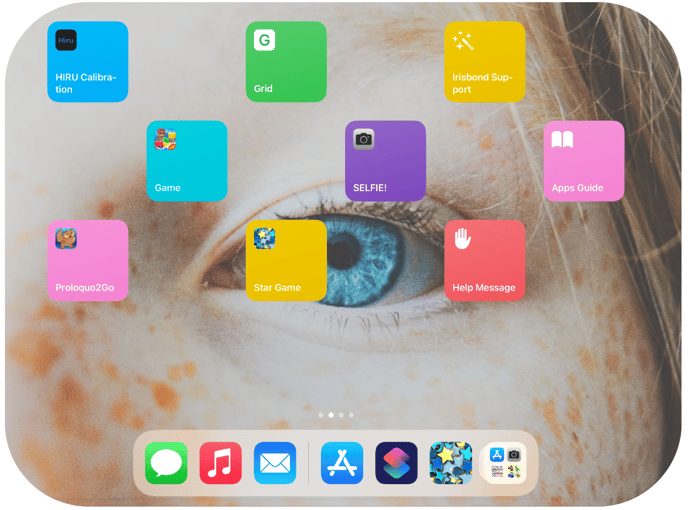
The large icons displayed on the screen, known as [widgets](https://knowledge.irisbond.com/en/ipad/settings/shortcuts?hsLang=en), make it easier for the user to access specific apps with convenience.
**APPS:** [Check our recommended apps for Early-stage users in our app guide!](https://knowledge.irisbond.com/en/hiru-ipad?hsLang=en#applications)
- [Frequently Asked Questions](https://knowledge.irisbond.com/en/frequently-asked-questions?hsLang=en#main-content)
- [iPad](https://knowledge.irisbond.com/en/frequently-asked-questions?hsLang=en#ipad)
- [Hiru](https://knowledge.irisbond.com/en/hiru?hsLang=en#main-content)
- [Release notes](https://knowledge.irisbond.com/en/hiru?hsLang=en#release-notes)
- [Eye tracking basics](https://knowledge.irisbond.com/en/hiru?hsLang=en#eye-tracking-basics)
- [Hiru & Windows](https://knowledge.irisbond.com/en/hiru-windows?hsLang=en#main-content)
- [Easy Click](https://knowledge.irisbond.com/en/hiru-windows?hsLang=en#easy-click)
- [Systray](https://knowledge.irisbond.com/en/hiru-windows?hsLang=en#systray)
- [Settings](https://knowledge.irisbond.com/en/hiru-windows?hsLang=en#settings)
- [Hiru & iPad](https://knowledge.irisbond.com/en/hiru-ipad?hsLang=en#main-content)
- [Set-up](https://knowledge.irisbond.com/en/hiru-ipad?hsLang=en#set-up)
- [Hiru App](https://knowledge.irisbond.com/en/hiru-ipad?hsLang=en#hiru-app)
- [Settings](https://knowledge.irisbond.com/en/hiru-ipad?hsLang=en#settings)
- [iPadOS](https://knowledge.irisbond.com/en/hiru-ipad?hsLang=en#ipados)
- [Applications](https://knowledge.irisbond.com/en/hiru-ipad?hsLang=en#applications)
- [Usage](https://knowledge.irisbond.com/en/hiru-ipad?hsLang=en#usage)
- [Oskol iOS](https://knowledge.irisbond.com/en/hiru-ipad?hsLang=en#oskol-ios)
- [Oskol 2](https://knowledge.irisbond.com/en/hiru-ipad?hsLang=en#oskol-2)
- [Versa Eye](https://knowledge.irisbond.com/en/hiru-ipad?hsLang=en#versa-eye)
[](http://irisbond.com)
Centro de ayuda irisbond.com
[mailto:email@email.com](mailto:email@email.com)
Copyright © 2026, IRISBOND